
Is DistroKid worth it for beginners?
Looking for the best distributor for your first song? Here’s how DistroKid works for beginners, based on my experience releasing 26 tracks in a year

Are you just starting out as an independent music artist and thinking about using DistroKid as your music distributor? Getting started with self-releasing your own music can feel a bit overwhelming at first, and choosing the right distributor for your first release is an important first step.
Show table of contents Hide table of contents
DistroKid is one of the world’s leading music distribution companies, and I’ve personally been using it to release all of my music for the past year or so. In this article, I’m going to cover everything you need to know about DistroKid — from a beginner’s perspective as an independent artist. I’ll explain how DistroKid works for first-time artists, and share my personal experience of using DistroKid when I was releasing my first songs.

Before we get going, do bear in mind that this article is based on my own experience using DistroKid as an independent artist. Features, pricing, and policies can change over time, and your experience may differ. For the most up-to-date information, be sure to check the official DistroKid website and terms.
Introduction — is DistroKid worth it for beginners?
If you’re just starting out as an independent artist, you’ll probably have realised that you can’t simply upload your music directly to Spotify or Apple Music. Instead, you’ll need to use a music distributor to get your songs onto streaming platforms. So, is DistroKid worth it for beginners, and is it the best distributor for your first song?
I’m a UK-based electronic artist, and I’ve been releasing all of my music through DistroKid since I started distributing my own tracks. Overall, I’ve found DistroKid to be very beginner-friendly, reliable, and easy to use. Once I settled on DistroKid as my distributor, I’ve continued using it for every release since — and I released 26 songs in 2025!
One of the main reasons why I think DistroKid works so well for beginners is how simple the upload process is. Once you’re signed up, distributing a song involves entering your track details (such as the title, artist name, and album artwork), choosing which stores you want to send it to (Spotify, Apple Music, YouTube Music, and more), and then clicking upload. There is not much more to it.
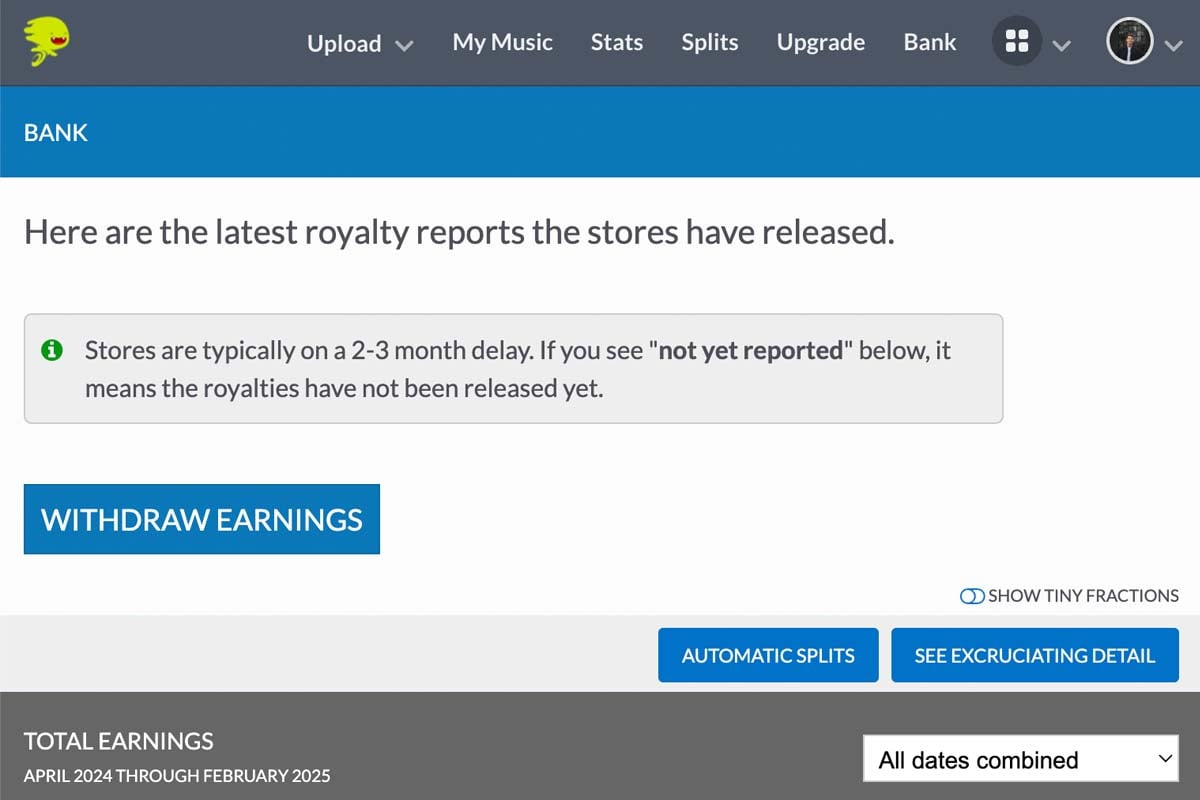
DistroKid’s distribution process is both fast and straightforward, and any royalties you earn are paid directly into the “Bank” section of your DistroKid account, where you can withdraw them to your own bank account after entering and confirming your details with DistroKid’s payment provider.
Can you mess anything up as a beginner on DistroKid?
One major concern when you’re just starting out is the fear of making a mistake that you can’t undo. Of course, it’s always possible to make mistakes but although there are some exceptions, it’s pretty difficult to permanently mess things up as a beginner on DistroKid.
For example, if you were to make a mistake such as a typo in a song title or uploading the incorrect album artwork, you can usually edit your release — or remove it from stores completely if necessary.
DistroKid is a non-exclusive distributor. This means that you keep full ownership of your music and you are free to switch distributors in the future if you want.
Any streaming or download earnings your music uploaded through DistroKid earns will be paid into your DistroKid account, where you’ll be able to withdraw it. However, one thing to bear in mind is that if your DistroKid plan expires (for example, you cancel it or your credit card payment is declined), your music may be removed from stores unless you keep your account active or use optional extras (such as the “leave a legacy” add-on).

What happens after you upload a song to DistroKid?
Once you’ve uploaded your music to DistroKid, the process is pretty hands-off. Before sending your music to stores, DistroKid will automatically check the details of your release to make sure that it is delivered to stores just the way they like it. This includes checking that your files, artwork, and metadata are formatted correctly and meet each store’s requirements.
If everything looks good and your release is approved, DistroKid will take care of distributing your music to the stores you selected (such as Spotify, Apple Music and Deezer). At this point, your release will be marked as “delivered” to stores on DistroKid, but it is still up to each individual platform to process the release and put it live.
How fast is it?
In my opinion, one of the biggest plus points of DistroKid as a distributor is how fast it is. I’ve found that my music is often approved and marked as delivered to stores on the same day I upload it to DistroKid, and it usually appears in my Spotify for Artists profile a few business days later.
As I mentioned above, different stores have different processing times. While DistroKid will often deliver your music to stores quickly, it can still take some time for your song to go live on each platform.
I recommend leaving at least a week (and preferably even longer) from when you upload your music to your actual release date, so you can be sure that it will appear in all stores at once. Overall though, DistroKid is a really fast music distributor for beginners.
Common beginner mistakes with DistroKid (and how to avoid them)
Here are some things to look out for if you’re just starting out with DistroKid.
Small errors while uploading your music to DistroKid, such as a typo in a track title or the incorrect artwork, can be corrected even after your release has been sent to stores. This is very handy if you need to edit a release without taking it down.
That being said, if for some reason you decide that you want to take down your music, you can simply remove your release from all stores at any time with DistroKid.
Other beginner mistakes may include forgetting to mark a track as explicit. Again, you can usually edit this through DistroKid, even after your release is live.
Overall, I’ve found DistroKid to be very beginner-friendly, and there are lots of help articles on the DistroKid website to guide you through the process of uploading your music for the first time.
Are there any drawbacks for beginners using DistroKid?
Overall, I think that DistroKid is one of the best distributors for your first song or if you’re a beginner just starting out. That being said, there are a few points that might be considered as “drawbacks” depending on your needs.
One thing to be aware of is that with DistroKid you can only sign up for a yearly plan. There’s no option to pay monthly, so you’ll need to pay for a full year upfront. This is definitely something to be aware of if you’re just starting out.
Another thing to bear in mind is that not all features are available on the lower-tier DistroKid plans. If you want extras like a custom label name or additional artist slots, you’ll need to choose a higher-tier plan.
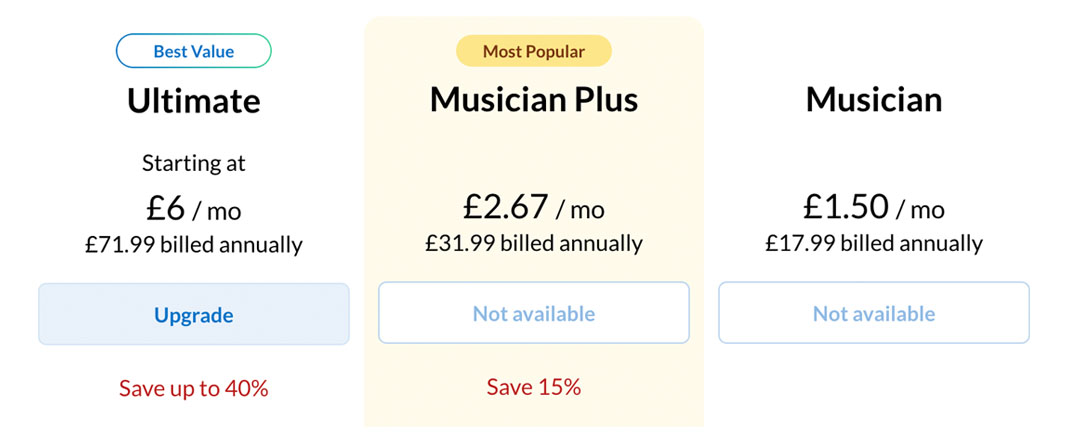
Finally, while I feel that DistroKid’s pricing is pretty reasonable overall, some features are offered as paid add-ons. For example, distribution to Beatport through DistroKid requires an extra fee, and registering your music with YouTube Content ID also costs extra. These add-ons are optional, but they will increase the overall cost if you decide that you need them.
Is there a DistroKid discount?
Yes. If you’re ready to release your first song and don’t yet have a DistroKid account, you can get 7% off your first year by signing up using the button below.
Final thoughts and conclusion
So, is DistroKid the best distributor for beginners? I can only speak from my own personal experience, but I think it’s definitely one of the best options.
The upload process is really simple and intuitive and I’ve continued to use DistroKid since choosing them as my sole distributor for my music. DistroKid is a really great option as one of the best distributors for a first song — and my experience overall has been very positive. If you’re interested in trying DistroKid, you can get 7% off your first year through this link.