
DistroKid price — how much does it cost and is it worth it?
Wondering how much DistroKid costs? Here’s a clear breakdown of pricing, plans, add-ons, and whether it’s worth paying for based on my experience

Are you thinking about joining DistroKid but wondering how much it costs and whether it’s really worth it? DistroKid is one of the world’s leading music distributors and I’ve been using them to release all of my music for the past year.
Show table of contents Hide table of contents
In this article, I’m going to cover everything you need to know about the cost of DistroKid, from the price per year and its monthly equivalent, to the various add-ons and extras available. I’m also going to discuss my own personal experience of using DistroKid as an independent music producer.

What is DistroKid?
If you’ve landed on this page, the chances are that you already know a bit about DistroKid, but let’s quickly cover the basics anyway. DistroKid is one of the world’s largest music distributors.
If you’re an independent artist, it’s one of the most popular options for getting your music onto streaming services such as Spotify, Apple Music, and YouTube Music.
The way DistroKid works is fairly straightforward: you choose the plan that best suits you, open an account, and then start releasing your music to all the major streaming platforms. I’ve personally been using DistroKid for the past year or so, and I’ll go into more detail about my experience later in this article.
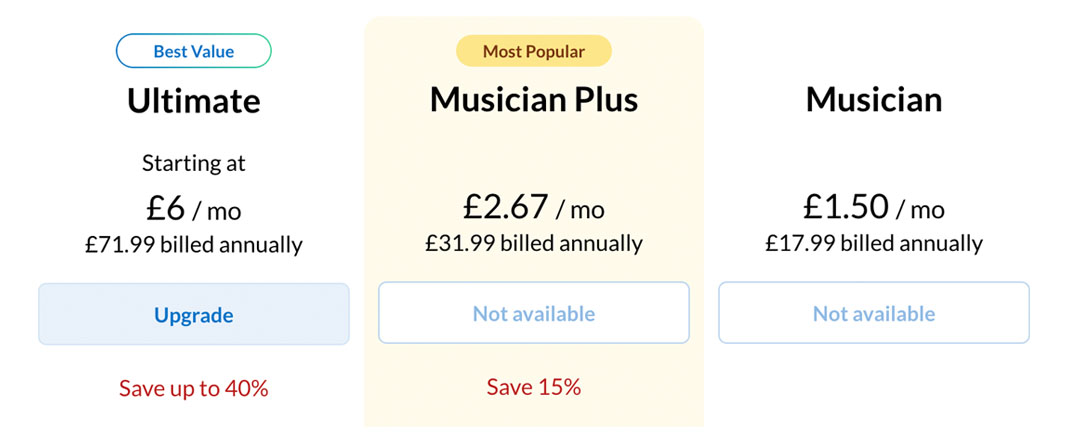
DistroKid pricing overview
The first thing to know about DistroKid is that all plans are charged on an annual basis. There is no monthly payment option.
At the time of writing this article, DistroKid has three main plans to choose from: Musician, Musician Plus, and Ultimate. Let’s break down the pricing and cover some of the main features of each plan.
I’ve shown the DistroKid plan pricing by currency (USD, Euros, and GBP). Remember that the details below were correct at the time of writing and may change over time.
1) DistroKid Musician plan
Price: $24.99 / €23.99 / £19.99 per year
Monthly equivalent: about $2.08 / €2.00 / £1.67 per month (billed annually)
Summary: This is DistroKid’s entry-level plan and the cheapest option. It supports a maximum of one artist and includes unlimited music uploads. It also allows you to upload lyrics and create royalty splits for your songs. The Musician plan is a good option if you’re just starting out and do not need features such as a customisable label name or customisable release dates.
2) DistroKid Musician Plus plan
Price: $44.99 / €42.99 / £35.99 per year
Monthly equivalent: about $3.75 / €3.58 / £3.00 per month (billed annually)
Summary: The DistroKid Musician Plus plan is for up to two artists and includes everything in the Musician plan, with some added extras. These include customisable label names, custom release dates, and synced lyrics in Apple Music. The Musician Plus plan is a good option if you need two artists in your account and want some of the added extras.
3) DistroKid Ultimate plan
Price: $89.99 / €81.99 / £71.99 per year
Monthly equivalent: about $7.50 / €6.83 / £6.00 per month (billed annually)
Summary: The DistroKid Ultimate plan is the one I use myself and offers the most features. It includes everything in the other two plans, with additional features, including support for anywhere from five to 100 artists in your account. It also includes file-sharing features and advanced analytics and statistics.
Optional add-ons and extra costs
DistroKid offers a wide range of paid extras and add-ons. Most of these are optional features that you can choose to add during the upload process when you’re releasing music through DistroKid’s platform.
Some of the optional extras include distribution to Beatport, as well as the option to “Leave a Legacy,” which means DistroKid will keep a specific release live on streaming platforms even if you cancel your subscription.
There is also a “Social Media Pack,” which allows you to register your songs with YouTube Content ID, helping you monetise videos that include your music across YouTube and other supported platforms.
Is DistroKid worth the cost? My review
Having used DistroKid for the past year or so, I can honestly say that it’s been great. I was previously using SoundCloud for Artists as my distributor, but I began looking into DistroKid as an alternative because SoundCloud for Artists didn’t offer some of the features I wanted at the time, including distribution to Beatport.
DistroKid makes it really easy to upload and submit music, and it’s incredibly fast at delivering releases to stores. There have been times over the past year when I’ve uploaded a song on a Monday with a Friday release date, and it’s made it onto Spotify with no issues.
I was also able to easily create my Official Artist Channel on YouTube and quickly gain access to Spotify for Artists to track how my music is performing.
Overall, I’m really happy with my decision to join DistroKid, and I truly believe it’s a great option if you’re an independent music artist looking to get your music out into the world. You can also check out my separate article on the pros and cons of DistroKid.
Is there a discount for DistroKid?
Yes. You can get 7% off your first year with DistroKid if you’re a new customer. To get started, simply tap the button below to claim your DistroKid discount.
Any negatives?
From my experience, there are not many drawbacks to discuss when it comes to DistroKid, but if I’m being totally honest, it would be nice to have the option to pay for plans on a monthly basis, like some other distributors.
The only other minor complaint I have is the fact that you’ll have to pay extra for add-ons if you want them. It might be nice for DistroKid to introduce a plan that includes everything as standard for a higher price in the future.
Is there anything else to consider?
One positive feature of DistroKid’s pricing and plans is that you can upgrade at any time. I personally started out on the Musician plan, but once I realised I wanted some of the features included in Ultimate, I simply upgraded.
This means that if you’re not sure which plan to go for at first, you can start with the cheapest one and see if it works for you. If it doesn’t and you require more features, you can always upgrade.
As I mentioned above, although the pricing and features I’ve discussed were correct at the time of writing this article, the details may change over time, so the best place to get the most up-to-date information is on the official DistroKid website.
Final verdict on DistroKid and its pricing
We’ve reached the end of my guide to DistroKid and its pricing. You’ve probably already guessed that I’m a big fan of DistroKid and the fact that I continue to use it as my music distributor to this day supports this.
If you’re interested in giving DistroKid a go, you can get 7% off your first year as a new customer through the button below.