
How to get your music on Beatport using DistroKid
Want your tracks on Beatport? Here’s how to use DistroKid to distribute your music based on my own personal experience

Beatport is one of the world’s largest electronic music stores, so if you’re an independent artist or producer, getting your music onto the platform can be a great idea in terms of exposure.
Show table of contents Hide table of contents
I’ve been releasing all of my music for my finalmartin project on Beatport via DistroKid, and in this article I’m going to explain how I’ve done so.

Introduction to Beatport
This is slightly embarrassing to admit, but believe it or not, I actually hadn’t heard of Beatport until I received a direct message on Instagram from a DJ asking why my music wasn’t on there — and this was after having produced electronic and house music for a number of years!
I did my research and quickly understood that if you make electronic music, it’s really important to have your music on Beatport, as it’s a prime place for DJs to purchase your songs for use in their sets.
I’m not going to go into too much detail about the way Beatport works, but it is pretty simple. You get your music on Beatport, and it’s then available for people (including DJs) to buy and download. It differs slightly from streaming platforms because you can actually download tracks (although Beatport does have its own streaming option too).
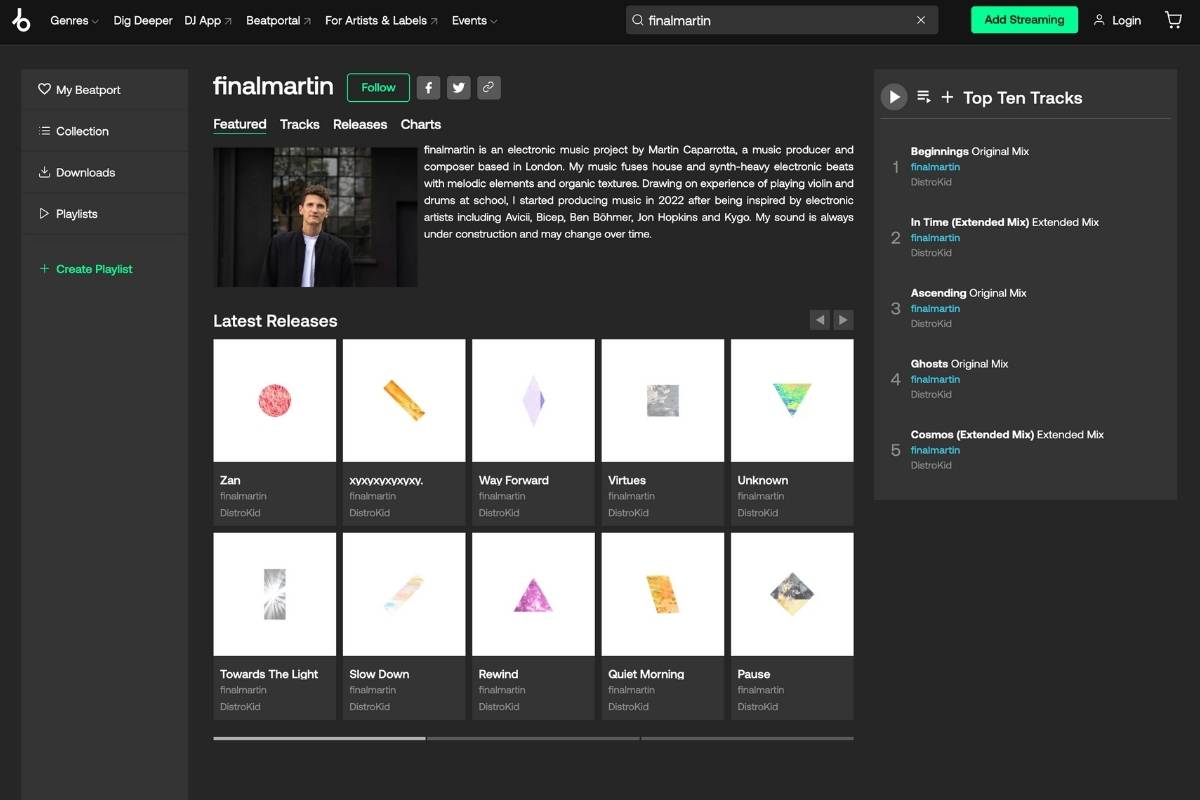
It’s also important to note that Beatport only accepts tracks in approved electronic subgenres. If you make music in other genres, Beatport is not for you. Also, some electronic subgenres — including electronic hip hop and electronic reggae/dancehall — are no longer accepted on Beatport and are now distributed via Beatsource instead.
Now that the scene has been set, I’m going to answer the key questions about getting your music on Beatport and explain how to do it.
Can you upload music directly to Beatport?
No. If you want to get your music on Beatport, you’ll have to either go through your label or do it through a distributor (like DistroKid) as an independent artist.
Not all distributors offer the ability to get your music on Beatport — but DistroKid is one of them, and this is one of the main reasons why I decided to leave SoundCloud for Artists and join DistroKid early on — because SoundCloud for Artists didn’t offer Beatport distribution.
Why use DistroKid to get on Beatport?
DistroKid is one of a select few music distributors that offers the option to get your music on Beatport. As I mentioned above, this is one of the main reasons why I chose and continue to stick with DistroKid.
DistroKid are also one of the world’s biggest and most popular music distribution platforms. And my experience of using them to get my music on Beatport has been simple and straightforward.
Some of the other distributors that also offer Beatport distribution include TuneCore and MusicHub, according to the help article about this on the Beatport website.
Requirements to upload to Beatport via DistroKid
To get your music on Beatport via DistroKid, you’ll have to have or set up a DistroKid account to distribute your music. If you don’t yet have a DistroKid account, you can open one and get 7% off your first year using the button below.
It’s important to note that Beatport distribution does not come included with DistroKid plans — it’s available as an additional extra for a monthly fee, which is $9.99 a month at the time of writing this article.
As mentioned above, you’ll also only be able to upload music to Beatport that is in the “electronic” music genre. No other genres of music can be uploaded to Beatport via DistroKid.
How to upload your music to Beatport using DistroKid
DistroKid offers distribution to Beatport as what they call an “Album Extra” for all DistroKid releases in the electronic genre. As mentioned above, Beatport distribution costs $9.99 a month and once purchased, gives you unlimited distribution to Beatport for all artists on your DistroKid account.
Sending your music to Beatport through DistroKid is really simple. You’ll first need to sign in to, or set up a DistroKid account.
After that, you simply upload your music to DistroKid while making sure to select the “electronic” genre and appropriate subgenre.
Once you have selected the “electronic” genre and subgenre, you will see the Beatport Unlimited Uploads album extra available in the “Extras” section alongside DistroKid’s other album extras.
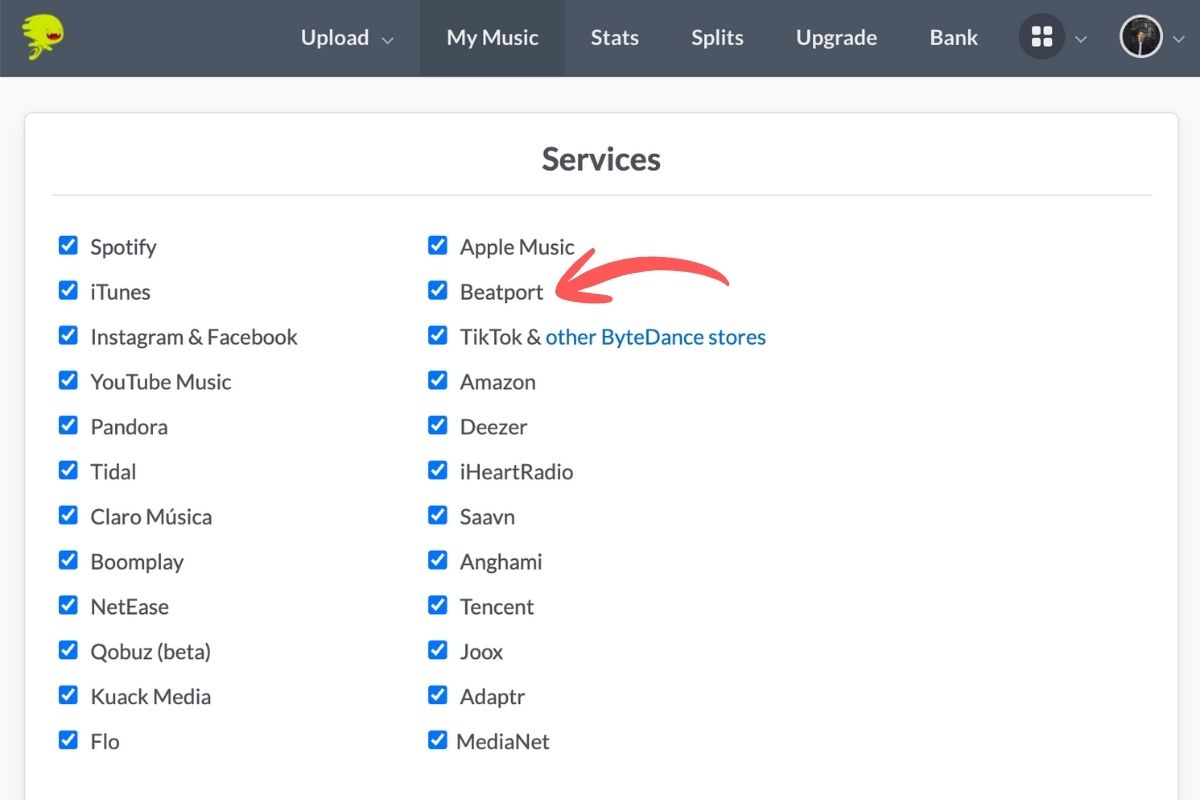
Once you have purchased the Beatport extra for the first time, the option to distribute your music to Beatport will be available for your past and future tracks (in the electronic genre), as shown in the image below. For the Beatport store option to show, you’ll need to select electronic as the genre of your track.
How long does it take and how much does it cost?
I found that DistroKid was really quick to distribute my music to all streaming platforms, but the time for it to appear in that store will vary from store to store. That being said, my releases always showed up on my Beatport profile on release day.
In general, it’s best to leave at least four weeks between when you upload your music to your release date, as that should usually allow enough time for stores to process everything properly.
Unlimited distribution to Beatport via DistroKid costs $9.99 a month as an additional extra at the time of writing this article. This is on top of the standard price of DistroKid.
My experience with my music on Beatport
As I make electronic music (mainly Melodic House), I decided that I would upload all of my releases to Beatport, which made sense given that I had decided to pay the monthly add-on fee with DistroKid.
The process was very simple, I just checked the Beatport box when deciding which stores to send my releases to, and my music appeared on Beatport on release day. You can check out my very own finalmartin Beatport artist profile here.
I’ve had a few sales of my music on there, which is really cool to see, and I’m hoping that as I continue to release new music and develop as an artist there will be more opportunity to increase this going forwards.
How do I claim my artist profile on Beatport?
There is no way to “claim” your artist profile on Beatport — any changes to your profile will have to be made manually by the Beatport team.
To do things like upload a profile picture and bio, you can reach out to Beatport’s support team once some of your music is live on Beatport, and ask them to update your information. You can find out more about how to do that in this Beatport help article about the topic.
Is DistroKid the best way to get on Beatport?
I can only speak from my experience, but I think so. Unless your label has the ability to upload music to Beatport, then going through DistroKid is a great way to get your music out there on Beatport.
As I mentioned above, there are some other distributors that offer Beatport distribution, but I’ve not used them so can’t comment on how they work or how easy their process is.
If you’ve not got a DistroKid account and are thinking about opening one, remember that you can get a discount off your first year by signing up using the button below.
Final thoughts
That brings us to the end of my guide to getting your music on Beatport via DistroKid. Overall, the process has been really simple for me and it’s been really cool to have my music distributed to Beatport.
DistroKid is one of the world’s leading music distributors and their Beatport distribution service is really easy to set up and use. The main downside of it is that it costs an additional monthly fee, but this at least includes unlimited Beatport distribution (as long as your tracks are in the electronic music genre).
As an electronic music producer, I’d say it’s pretty important to have your music available on Beatport, as it’s such a big store for DJs and other industry professionals.
As I mentioned above, I’ve had a few sales of my music on Beatport, which is encouraging, and hopefully these will continue to grow over time as I produce more music.