
How to get a YouTube Official Artist Channel via DistroKid
Getting an Official Artist Channel on YouTube helps you present your music professionally — here’s how I set mine up using DistroKid

If you’re an independent artist, getting an Official Artist Channel on YouTube is really important and can help you professionalise your presence on the platform. As well as getting the “verified music note” next to your username on YouTube, you’ll also gain more control over how your releases appear on your channel.
Show table of contents Hide table of contents
When I first started out as an independent music producer and creator, I had no idea what an Official Artist Channel was, so I’ve decided to write this guide to explain the basics and how it all works. This guide is written from my experience of setting up my Official Artist Channel on YouTube myself — you can check out the final result and my official channel here.

A quick note before we start
This guide is based solely on my own experience of setting up an Official Artist Channel using DistroKid.
YouTube and music distributors can change their requirements and processes over time, so it’s always a good idea to double-check the latest official documentation before getting started. You can see DistroKid’s help article about Official Artist Channels here, and YouTube’s official guide here.
I also only have direct experience using DistroKid as my distributor. If you’ve used or are using a different distributor, I can’t comment on how the Official Artist Channel process works.
What is a YouTube Official Artist Channel (OAC)?
A YouTube Official Artist Channel (sometimes known as an OAC) is a special type of YouTube channel designed specifically for musicians and artists who release music on streaming platforms. It brings together your regular YouTube uploads and your official music releases into a single, verified artist channel.
Official Artist Channels are an official YouTube feature reserved specifically for musicians and artists, and there are some requirements that you’ll need to meet before applying, which I’ll cover below.
In essence, an Official Artist Channel makes it clear to both YouTube and your audience that your channel represents you as an artist. With an Official Artist Channel, your releases delivered to YouTube Music, plus any other content you upload, all live in the same place. This helps create a cleaner, more professional presence on the platform.

If you’ve already delivered some music to YouTube via a distributor, you may have noticed that your music videos live in an automatically generated YouTube “topic” channel for your artist name. Having an Official Artist Channel consolidates this topic channel into your main channel, so that your releases show up in your OAC instead.
Your music released via a distributor will show up on your Official Artist Channel in a new tab labelled “Releases,” which acts like a discography (you can see my “Releases” tab here). Provided you’ve set everything up correctly, your future releases will also be delivered to your channel via this tab.
The benefits of having the “music note” badge on YouTube
One of the cool features of having an Official Artist Channel is the verified “music note” that appears next to your username on YouTube. It might seem like a minor detail, but I think it adds some credibility to your channel and shows that you’re a verified artist on the platform.

If you’re an independent artist, and especially if you’re just starting out, I feel like this helps to add credibility straight away, even if you don’t have a huge following. It’s also a signal to users that this channel is where your music releases can be easily found.
DistroKid requirements for getting an Official Artist Channel
Joining DistroKid
If you don’t yet have a DistroKid account, you can get 7% off your first year as a new customer by clicking here.
Before you can apply for an Official Artist Channel via DistroKid, there are a few basic requirements you’ll need to meet. These are largely set by YouTube rather than DistroKid, but DistroKid makes it clear what’s needed and guides you through the process.
Firstly, you’ll need a dedicated YouTube channel that represents you as an artist. This will become your Official Artist Channel once the verification process is complete. You’ll need to have created and uploaded at least one video (YouTube Shorts don’t count).
You’ll need to have at least one release distributed to YouTube Music via DistroKid which is live on YouTube. This is important, as YouTube uses your distributed releases to link your music to your channel and complete the setup.
Your existing YouTube channel name must also exactly match your artist name in order to apply for an Official Artist Channel via DistroKid.
There are a few other things to bear in mind, which are covered in the official DistroKid help article about getting an Official Artist Channel here.
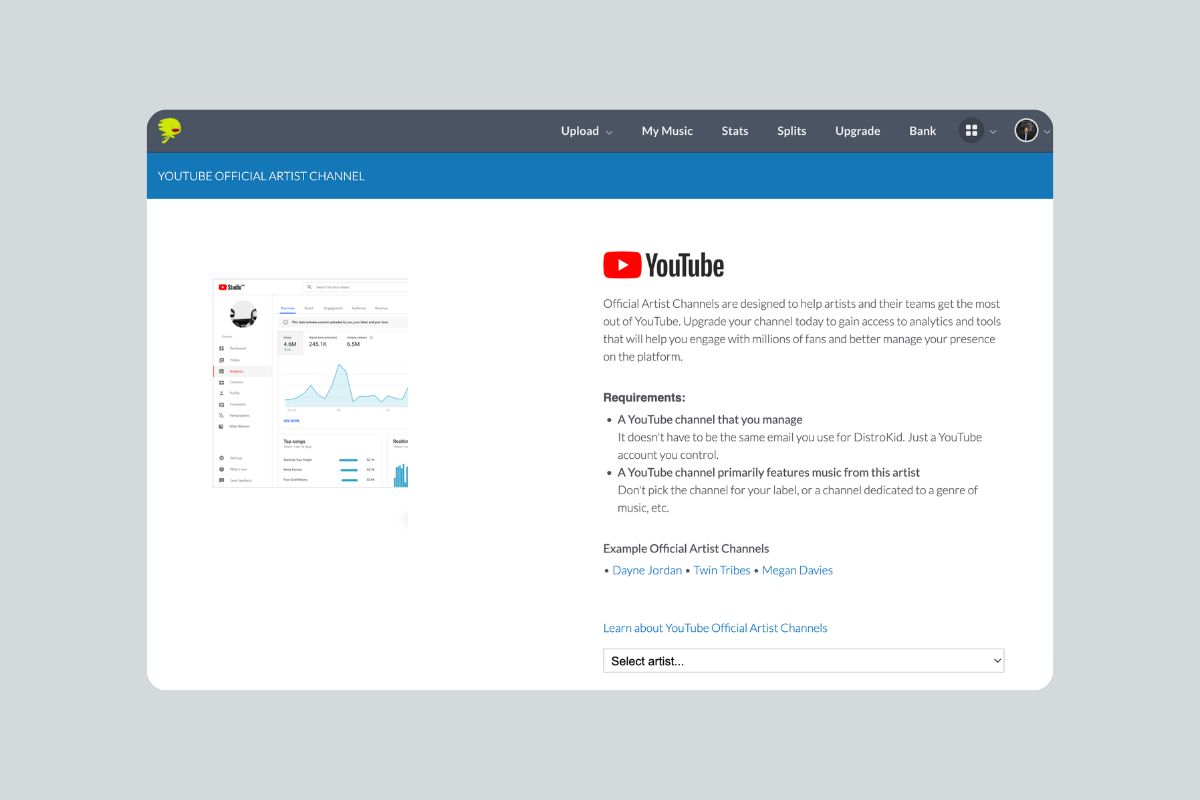
Some of the important things to note are that you can only link one artist to a YouTube account (for example, you can’t convert a label channel into an Official Artist Channel). Also, your YouTube Topic Channel remains a separate channel, even after the Official Artist Channel is claimed (although your releases will also be distributed to your OAC now too).
There are a few other things to be aware of, so I strongly recommend reading the DistroKid help article before getting started, so you know exactly what to expect. I’m not going to cover the steps for creating a new YouTube channel in this article, but you can check out Google’s guide to creating a YouTube channel here.
How to get an Official Artist Channel via DistroKid
Once you’ve ensured that you meet the requirements, you can apply for your Official Artist Channel from your DistroKid dashboard.
Firstly, make sure you’ve uploaded at least one release through DistroKid and that YouTube Music delivery is enabled for that release. Your music needs to be live on YouTube before you can request an Official Artist Channel.
Next, navigate to the application page. You’ll find this under “Special Access > YouTube Official Artist Channel” in the menu next to your profile picture on the DistroKid website header.
There, you’ll be prompted to select the artist and then link your existing YouTube channel. Once you’ve submitted your request, DistroKid will send the information to YouTube on your behalf. At this point, there’s nothing else you need to do — you just need to wait for YouTube to review and process the request.
If everything has been set up correctly, your existing YouTube channel will be converted into an Official Artist Channel. Your music releases will then appear under the “Releases” tab, alongside your regular uploads, creating a single, unified channel for your music and content.
How long does the verification take? My experience
I launched my finalmartin project in January 2025 and applied for an Official Artist Channel shortly after releasing my first track. For me, the whole process took only a few days, which was really cool.
I went back through my emails to check the dates — I got the first confirmation email from YouTube saying that they were processing my Official Artist Channel request on January 3. I then received the confirmation email from YouTube that my Official Artist Channel was set up on January 12, so overall, the process took only nine days, which was great. It was smooth sailing.
Obviously, you should bear in mind that this was just my experience, and DistroKid says that it can take a few weeks for your request to be processed.

Is there a DistroKid discount?
If you don’t yet have a DistroKid account, you can sign up for one through the button below. If you’re a new customer, using this link will automatically give you 7% off your first year with DistroKid.
My final thoughts
So we’ve reached the end of this guide to getting a YouTube Official Artist Channel through DistroKid. Getting set up with an Official Artist Channel can feel a bit technical at first, but once you’re up and running it’s a great way to professionalise your presence on YouTube as an artist.
The whole process was simple and straightforward for me and took only a few days to complete. If YouTube plays any role in how you share or promote your music, setting up an Official Artist Channel is a smart move and something I’d recommend doing sooner rather than later. If you’re an electronic music artist, be sure to also check out my guide to getting your releases onto Beatport.